Transform Your Digital Notes with Paradise Templates
If you've ever stared at a blank digital notebook page and felt that familiar creative block, you're not alone. Whether you're a designer sketching out client concepts, an entrepreneur mapping business strategies, or a content creator organizing editorial calendars, the tools you use shape how effectively you capture and develop ideas. That's exactly why Paradise Digital Note Templates caught my attention — and why they've earned a permanent spot in my own creative workflow.
A Color System That Actually Makes Sense
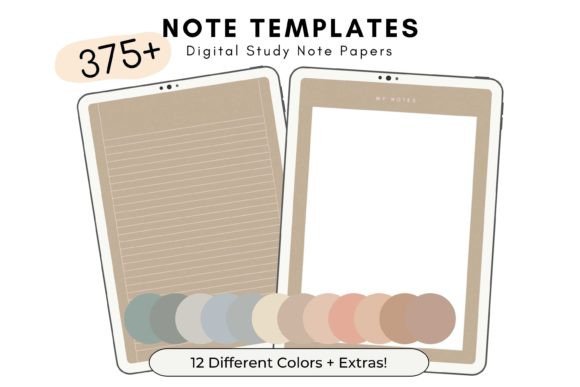
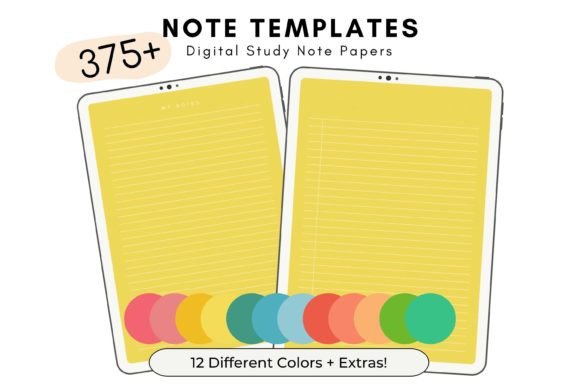
What sets this collection apart isn't just the volume — though 420 individual PDF files is genuinely impressive. It's the thoughtful organization behind the numbers. Each of the 12 distinct color shades contains 33 different note template styles, a weekly planner, and a to-do list. That means you're not rummaging through a chaotic folder looking for the right layout. You pick your color, and everything you need is right there, grouped logically and ready to use.
The color palette itself feels carefully curated rather than randomly assembled. These aren't garish, oversaturated tones that assault your eyes during long study sessions. They're refined, modern shades that create a cohesive visual environment. Think of them as the digital equivalent of a well-designed stationery collection — the kind you'd find at a boutique paper goods shop, except entirely digital and infinitely reusable.
For anyone who works across multiple projects or clients, the color-coding system becomes immediately practical. Assign one shade to client A, another to personal projects, a third to content planning. Your brain starts associating colors with contexts, which speeds up navigation and reduces mental friction. It's a small design detail with surprisingly significant productivity implications.
Designed for Real Work, Not Just Aesthetics
Let's be honest about something. Many digital note templates prioritize looking pretty on a product listing over actually functioning well during daily use. Paradise Digital Note Templates strikes a genuine balance between visual appeal and practical utility. The 33 different template styles within each color group aren't minor variations of the same grid — they represent genuinely different layouts suited to different thinking and planning tasks.
As someone who's tested dozens of digital planning systems, I can tell you that template variety matters more than most people realize. A brainstorming session needs open, flexible space. A weekly planner demands structured time blocks. A project tracker requires columns and checkboxes. Having all these layouts available within a single, cohesive color system means you're not cobbling together mismatched files from different creators. Everything feels unified, which keeps your digital workspace visually calm and professionally consistent.
The inclusion of 10 bonus notebook covers is a thoughtful addition that many template sets overlook. These covers let you create distinct notebooks for different purposes — study notes, business planning, creative journaling — each with its own identity while maintaining the overall Paradise aesthetic. For designers and brand strategists who think in terms of visual systems, this kind of built-in cohesion is genuinely valuable.
Practical Applications Across Creative and Professional Work
The US Letter size format (8.5 x 11 inches) makes these templates immediately compatible with standard print workflows if you ever need physical copies, but the real strength lies in digital annotation. GoodNotes users will find seamless integration, and the PDF format plays nicely with virtually any annotation app — Notability, Xodo, PDF Expert, and others all handle these files without issues.
Here's where I see the strongest use cases based on different professional needs:
- Designers and brand strategists can use the varied layouts for mood boarding, client presentation notes, and project briefs. The color system naturally supports organizing by client or project phase.
- Entrepreneurs and small business owners benefit from the weekly planners and to-do lists for strategic planning, goal tracking, and operational organization without investing in expensive planning software.
- Content creators, bloggers, and publishers can structure editorial calendars, outline articles, and manage content pipelines using the different template styles suited to linear notes versus freeform brainstorming.
- Marketers working across campaigns find the color-coded system helpful for maintaining separation between different initiatives while keeping everything accessible in one place.
- Crafters and hobbyists appreciate having a beautiful, organized space for personal project planning, learning notes, and creative exploration.
Understanding the Value of Unlimited Use
One detail worth emphasizing: these templates come with unlimited usage rights. You're not purchasing a single-use license or paying per project. Download the ZIP file once, extract the individually grouped PDFs, and use them as many times as you want across as many projects as you need. For professionals who create new notebooks regularly — whether for personal organization or client work — this eliminates recurring costs entirely.
The file organization deserves recognition too. Instead of receiving one massive PDF that requires you to extract and separate individual pages, each template is delivered as its own standalone PDF file, already grouped by color. This might seem like a minor technical detail, but anyone who's wrestled with splitting large PDF files knows how much time this saves. You simply open the color folder, find the layout you need, and import it.
Making These Templates Work in Your Existing System
If you're already using a digital planning or note-taking system, integrating Paradise Digital Note Templates requires minimal adjustment. The consistent color palette means new pages blend naturally with existing content rather than creating visual disruption. I'd recommend starting with one color family and exploring all 33 template styles within it before branching out. This gives you a complete understanding of the layout options available and helps you identify which styles suit your specific workflows best.
For anyone building a personal brand identity or maintaining a consistent visual presence across digital platforms, having a unified note and planning system contributes to that larger sense of professionalism. When you share screen recordings, create tutorial content, or present planning processes to clients, a visually cohesive workspace signals intentionality and attention to detail — qualities that matter in competitive creative and business environments.
The practical reality is this: good tools remove friction between thinking and capturing ideas. Paradise Digital Note Templates does exactly that, with enough variety and visual refinement to keep your digital workspace feeling fresh rather than monotonous. Whether you're studying, planning a business launch, organizing a content strategy, or simply keeping life in order, having 420 ready-to-use templates organized by color and purpose means the right layout is always within reach.