Create Stunning Glow Effects with Neon Names Templates
In the world of digital design, capturing attention often comes down to creating a distinct mood. If you are working on a project that requires a bold, electric, or nostalgic vibe, standard typography might fall flat. This is where the Neon Names Photoshop Templates come into play. Rather than spending hours trying to manually replicate the complex interplay of light, shadow, and reflection that makes neon signs look realistic, this asset provides a streamlined solution. It allows you to transform standard text or logos into glowing masterpieces, offering a professional finish without the steep learning curve typically associated with advanced lighting effects in Photoshop.
Understanding the Visual Appeal
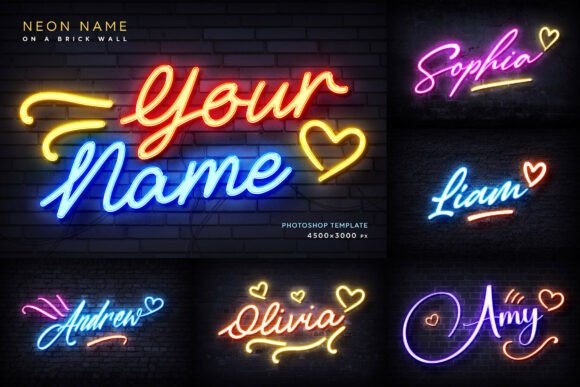
The core strength of these templates lies in their commitment to realism. When you apply a neon effect, it shouldn't just look like a bright line of text; it needs to interact with its environment. The Neon Names Photoshop Templates are designed to simulate this interaction perfectly. They feature vibrant light effects that bleed slightly into the surrounding area, mimicking how real glass tubes emit light. Furthermore, the inclusion of subtle wall textures and realistic reflections adds a layer of depth that separates amateur graphics from professional design assets. The visual personality is unapologetically bold and modern, yet it carries a hint of retro charm depending on the background and font style you choose.
One of the standout features is the handling of color. Often, when designers attempt to create neon effects manually, they struggle with color consistency. These templates solve this by allowing you to pick any color, which then instantly transforms into the neon glow. This automation ensures that the luminosity, saturation, and reflection tones remain balanced. Whether you are looking for a classic warm white, a cool blue, or a vibrant pink, the underlying mechanics of the template adjust to ensure the light looks authentic. This is particularly useful for maintaining a specific brand identity where color accuracy is non-negotiable.
Practical Applications for Modern Creators
Where do these templates fit into your workflow? The applications are surprisingly diverse. For social media graphics, the "stop the scroll" effect is essential. A glowing neon header or a highlighted keyword can make a post stand out in a crowded feed. It works exceptionally well for Instagram stories, YouTube thumbnails, and event announcements on Facebook. The visual hierarchy is immediately established; the eye is drawn to the glowing element first, making it perfect for calls to action or key dates.
Beyond digital marketing, the Neon Names Photoshop Templates are excellent for print and physical mockups. If you are a designer pitching a signage concept to a client, showing them a realistic render of their logo as a neon sign adds immense value to your presentation. It moves the concept from abstract to tangible. Additionally, consider the world of personal branding and invitations. Birthday parties, bachelorette weekends, or even digital wedding invitations often benefit from a touch of flair. Instead of generic clip art, using these templates allows you to create custom, high-resolution imagery that feels bespoke.
For entrepreneurs and small business owners, particularly those in the hospitality, entertainment, or nightlife sectors, this tool is invaluable. Creating window displays, menu headers, or promotional posters that mimic the ambiance of your physical location helps bridge the gap between your online presence and your in-store experience. It is a subtle way of communicating the atmosphere of your brand before the customer even walks through the door.
Workflow and Technical Considerations
From a technical standpoint, the workflow is designed for efficiency. The process relies on Smart Objects in Photoshop. If you are unfamiliar, a Smart Object is essentially a container that preserves the source content of an image with all its original characteristics. In this case, you simply double-click the Smart Object layer, place your text or logo inside, and save. The template then automatically applies the complex lighting, reflection, and texture effects to your specific design. This non-destructive workflow means you can experiment freely without damaging the original file.
The resolution is another critical factor. At 4500×3000 pixels, these templates are high-resolution assets. This ensures that your designs remain crisp and clear, whether they are viewed on a high-DPI mobile screen or printed as a large-format poster. You won't have to worry about pixelation or blurry edges, which is a common pitfall when using lower-quality design assets. This level of detail is essential for maintaining professionalism, especially in commercial work where brand perception is tied to visual quality.
Furthermore, the versatility of the backgrounds included cannot be overstated. You have nine different options ranging from dark, moody textures to cleaner surfaces. This variety allows you to match the template to the specific mood of your project. If you are designing for a gritty, industrial brand, the brick or concrete textures work perfectly. For something more sleek and modern, the cleaner options provide a better canvas. The ability to support multiple colors in one design also opens up creative possibilities, allowing for complex, multi-toned neon arrangements that look dynamic and engaging.
Design Strategy and Final Thoughts
When integrating these effects into your broader design strategy, think about contrast and readability. While the glow effect is the main attraction, it should support your message, not overshadow it. Pairing the neon text with a clean, sans-serif font for body copy often creates a balanced font pairing. The neon element acts as the display font—bold and expressive—while the supporting text remains legible and grounded. This contrast creates a sophisticated visual hierarchy that guides the viewer's eye naturally through the content.
Ultimately, the Neon Names Photoshop Templates offer a practical solution for adding high-impact visual flair to a wide range of projects. They bridge the gap between complex Photoshop techniques and the need for quick, professional results. Whether you are a seasoned designer looking to speed up your workflow or a small business owner creating your own marketing materials, this resource provides the tools to achieve a polished, luminous aesthetic with minimal effort.