Canva Templates Pizza Menus: A Designer's Take on These Modern Layouts
Let's be real for a second. Creating marketing materials from scratch is a time-consuming nightmare, especially when you're trying to run a business. I've been there—staring at a blank canvas, trying to conjure a flyer or menu that doesn't look like it was made in Microsoft Word '98. That's why I'm always on the lookout for solid, reliable design assets that actually save time without sacrificing quality. I recently came across a package called Canva Templates Pizza Menus, and I want to break down what it offers, who it's for, and how to actually use it effectively.
What Exactly Are You Getting?
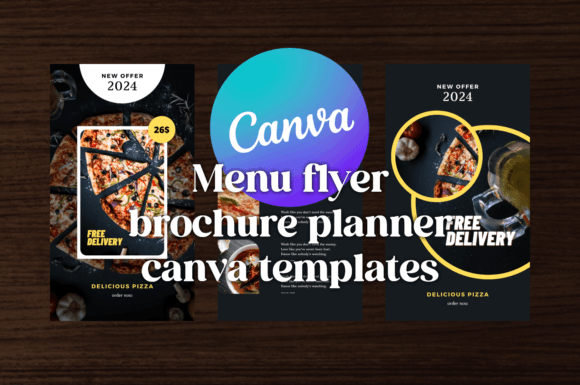
First, let's demystify the name. "Canva Templates Pizza Menus" is a bit of a misnomer; it's far more versatile than that. Yes, the demo designs are themed around a pizzeria, showcasing a dark blue and orange color palette. But the real product is a set of three contemporary modern layout designs. Think of the pizza theme as a proof of concept. The core value is the structure, the visual hierarchy, and the overall graphic design principles baked into each template.
The package includes three distinct layouts: a Flyer, a Menu, and a Brochure. You also get variations for digital use, like an Advertising piece and a social media Story template. The delivery is practical—you receive a Zip file containing PDF and PNG previews, but the main event is the Link Templates Editable in Canva. The process is straightforward: create a free Canva account, click the link, and a copy of the template is saved to your dashboard. From there, you have full control to adapt the design.
The Visual Style: Modern, Bold, and Intentional
The aesthetic here leans into a clean, modern typography look with a strong sense of contrast. The dark blue provides a stable, professional foundation, while the orange acts as a vibrant accent for calls to action, headings, or key details. This isn't a whimsical, hand-drawn style. It’s structured. It’s confident.
The layouts make excellent use of visual hierarchy. Your eye is guided naturally from the main headline to the key offerings and finally to the contact information or QR code. The designers have considered spacing, alignment, and the balance between text and imagery. For a small business owner, this is crucial. You don't have time to learn the intricacies of white space or typographic rhythm; the template has already done that heavy lifting for you.
Who Is This For? (It's Not Just Pizzerias)
While the demo is pizza-focused, the applications are broad. The core of these Canva Templates Pizza Menus is a flexible framework for presenting information clearly and attractively. Here’s who I see benefiting most:
- Restaurant & Cafe Owners: Obviously. Swap out the pizza images for your tacos, sushi, or lattes. The menu layout is ready for your prices and descriptions.
- Event Promoters & Marketers: The flyer and story templates are perfect for promoting a gig, a workshop, a sale, or a local event. The bold style grabs attention in a crowded social media feed.
- Small Business Owners & Entrepreneurs: Need a quick one-page brochure for a networking event? Or a promotional flyer for a seasonal offer? This package provides a professional starting point.
- Content Creators & Bloggers: Use the story template to announce a new blog post, podcast episode, or YouTube video. The consistent brand identity across your visuals builds recognition.
- Freelance Designers & Hobbyists: If you're designing for a client or a personal project, these templates can serve as a foundation to build upon, saving hours of initial layout work.
Practical Guidance: How to Use and Evaluate These Templates
Having a template is one thing; using it well is another. Here’s my practical advice for getting the most out of this package.
1. Don't Just Reskin—Restrategize
Before you start changing colors and dropping in your own photos, look at the structure. Ask yourself: Does this information flow make sense for my message? Maybe you need to swap the order of sections or combine elements from two different templates. The goal isn't to make a "pizza menu" with your logo; it's to use the design assets to tell your story more effectively.
2. Font Pairing and Customization
The templates use specific fonts. In Canva, you can easily change these. My rule of thumb: keep the display font for headlines to maintain the template's bold personality, but consider swapping the body text font for one that aligns better with your existing brand identity. If your brand uses a clean sans serif font, use that for the body text to maintain consistency. The template's strength is its layout; the fonts are interchangeable parts.
3. Color is Your Lever
The dark blue and orange are a strong starting point, but they're not mandatory. Use Canva's color picker tool to apply your brand's primary and secondary colors. A quick tip: keep the high-contrast structure. If your brand uses navy and gold, great. If it uses forest green and cream, ensure the cream is light enough for readability against the green for text elements.
4. Readability is Non-Negotiable
This is where many DIY designs fail. The templates are built with readability in mind, but once you start adding your own text, check it. Is the body text large enough? Is there enough contrast between the text and the background? Print a test page or view it on a mobile device. If you have to squint, it's not working. A beautiful menu is useless if people can't read the specials.
5. Commercial Licensing and File Formats
The package includes PDF and PNG files, which are great for sharing previews or quick social posts. However, for print, you'll want to export a high-quality PDF from Canva. For digital use, PNGs are standard. The key is the editable Canva link, which gives you the source file. Always check the license details provided with your purchase to understand what's permitted for commercial use—most template licenses allow for end products (like a printed menu or a digital ad) but not for reselling the template itself.
The Bottom Line
The Canva Templates Pizza Menus package is a practical toolkit for anyone who needs to produce polished marketing collateral quickly. It's not about the pizza; it's about the modern typography, the considered layout, and the time it saves you. It’s a solid example of how premium font choices and thoughtful graphic design principles can be packaged into an accessible format for non-designers. For the entrepreneur, the marketer, or the content creator, it’s a resource that can elevate your visual communication from "homemade" to "professionally presented" in a matter of minutes. That, in my book, is a worthwhile investment.