20 Canva CV Templates: Modern Resumes for Any Career
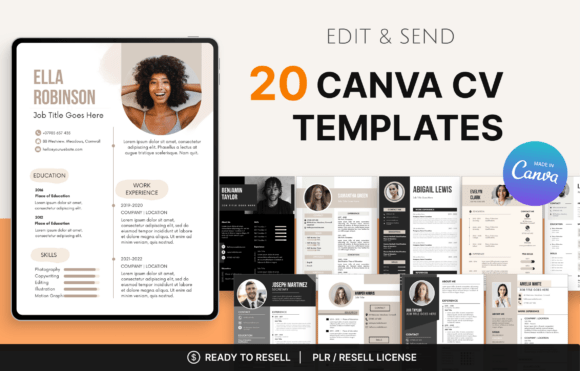
First impressions are everything in the job market, and your CV is often the very first handshake you have with a potential employer. It’s not just a list of jobs; it’s a visual representation of your professional identity. That’s where having a solid collection of design assets becomes critical. If you’ve been struggling to create a document that balances professionalism with modern flair, the 20 Canva CV Templates package offers a comprehensive solution. It’s a curated set of fully editable designs that bridge the gap between bland text documents and over-the-top graphic resumes.
Anatomy of a Modern CV Design
When we talk about modern typography in the context of CVs, we aren't just talking about picking a trendy sans serif font. It’s about how information flows. The 20 Canva CV Templates included in this collection utilize clean layouts that prioritize hierarchy. You’ll find a smart balance of white space, structured columns, and strategic use of color blocks. Unlike traditional Word documents, these templates use grid systems to align your experience, skills, and education in a way that is easy for a recruiter to scan in six seconds or less.
The visual personality of these templates leans toward the minimalist and the corporate-chic, but with enough warmth to feel human. You won't find cluttered graphics or distracting borders here. Instead, the focus is on readability. The designers have chosen typefaces that look sharp on both screens and print. Whether you prefer a classic serif font for a law firm application or a sleek, geometric sans serif font for a tech startup, the variety within these 20 options covers the entire spectrum. The use of negative space ensures that your content breathes, preventing the "wall of text" effect that often causes hiring managers to skim over key details.
Practical Applications Beyond the Job Hunt
While the primary goal is employment, the utility of a high-quality CV template extends far beyond a standard job application. For freelancers and entrepreneurs, these templates serve as excellent starting points for "About Me" pages or media kits. If you are a content creator pitching to brands, a polished CV layout can act as a one-page portfolio summary that highlights your past collaborations and metrics.
Furthermore, if you are in the business of digital products, the included PLR (Private Label Rights) license changes the game. This isn't just a tool for personal use; it's a business asset. You can take these design assets, tweak the color palettes, swap out the display fonts, and rebrand them to sell on your own website or Etsy shop. Imagine a small business owner who needs to create a uniform look for their team’s internal profiles. You can provide them with a customized version of these templates. Because the files are in Canva, the barrier to entry is low for your clients—they don't need expensive software to edit them.
Design Strategy: Fonts, Pairings, and Brand Identity
A CV is essentially a personal advertisement, and brand identity matters. One of the strengths of this collection is how it handles font pairing. Good design usually involves contrasting a header typeface with a body typeface. For example, you might see a bold, wide sans serif font used for your name and section headers, paired with a highly legible, standard serif or sans serif for the body text. This contrast creates a visual hierarchy that guides the eye naturally from your name down to your most recent experience.
When customizing these templates, consider the industry you are targeting. A creative role in editorial design or packaging design might allow for a touch of personality—perhaps swapping a standard header for a subtle script font or a handwritten font for your name, provided it remains legible. However, for corporate roles, sticking to the premium fonts included in the original design is usually safer. The templates are built to be flexible. You can easily adjust the kerning (letter spacing) and leading (line spacing) in Canva to fine-tune the density of the text, ensuring that your CV doesn't look cramped even when you have extensive experience to list.
Technical Execution and Customization Tips
When you open these 20 Canva CV Templates, you’ll find they are organized logically. To get the most out of them, follow these practical steps:
- Assess the Hierarchy: Before you start typing, look at the structure. Identify where the header, sub-headers, and body text are. This tells you how to format your own information for maximum impact.
- Color Psychology: The templates come with pre-set color schemes, but you should change them to match your personal brand identity or the company culture you are applying to. Use dark neutrals for finance and law, or muted pastels for lifestyle and wellness industries.
- Image Handling: Some layouts include space for a headshot. Ensure your photo is high-resolution and professionally lit. A grainy selfie can ruin the professionalism of a modern CV.
For those planning to resell these templates, consider the commercial font licensing. Canva’s free fonts are generally safe for commercial use, but if you swap in a premium font from an external source to make your templates unique, ensure you have the rights to distribute it, or instruct your customers on how to replace it. The best approach is to utilize the best creative fonts available within Canva’s library to ensure the end-user experience is seamless.
Ultimately, a great CV is about clarity. It removes friction between you and the interview. Whether you are a marketer looking to climb the ladder or a designer helping clients build their web design portfolios, having a reliable set of templates is a strategic advantage. These 20 designs provide the structure; you just bring the story.