Cutting Templates for Earring: Craft Stylish Two-Layer Designs
Creating professional-looking accessories at home has never been more accessible, thanks to the rise of digital design assets. If you are looking to expand your jewelry line or simply want a fun weekend project, the right cutting templates for earring designs are essential. This specific collection focuses on a versatile, two-layer geometric style that bridges the gap between modern typography aesthetics and physical fashion accessories. Just as a designer selects a premium font for a logo, a crafter must select a high-quality template to ensure clean cuts and a polished final product. This guide explores how to leverage these SVG files to create stunning faux leather earrings that look store-bought.
The Anatomy of a Two-Layer Design
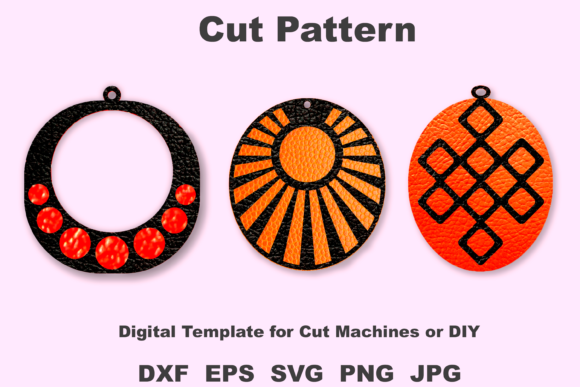
When you open the file, you will notice the design is split into two distinct layers. This is a crucial design choice that adds depth and dimension, similar to how a designer uses visual hierarchy in editorial design. The back layer provides a solid foundation, while the front layer features intricate cutouts or contrasting shapes. This layering technique is a staple in modern accessory design because it creates a shadow effect that makes the piece pop. The templates are sized at approximately 15 inches wide within the file, but the true beauty of digital design assets lies in their scalability. You can resize these vector files to suit your specific needs without losing quality, ensuring your brand identity remains consistent across different earring sizes.
Material Versatility: Beyond Faux Leather
While the preview images show these cutting templates for earring designs rendered in faux leather, the possibilities are nearly endless. Think of the template as a typeface; just as a sans serif font can feel corporate or casual depending on the context, this earring shape changes personality based on the material.
- Faux Leather: Offers a sleek, professional finish perfect for everyday wear. It is lightweight and comes in endless textures, from smooth matte to crocodile prints.
- Glitter Canvas: Ideal for statement pieces or holiday collections. The two-layer design allows the glitter to peek through the top layer for a subtle sparkle.
- Felt: Provides a soft, playful aesthetic. Using high-quality wool felt ensures the earrings hold their shape and look premium.
- Felt-Backed Fabric: This is a great option for upcycling. Old denim or patterned cotton can be stiffened with fusible interfacing and cut using these templates.
Experimenting with materials is akin to testing font pairings in graphic design. You might pair a smooth black faux leather back with a patterned printed fabric front to create a unique look that defines your small business’s style.
Technical Precision: File Formats and Cutting Machines
For entrepreneurs and serious hobbyists, the technical specifications of the file are just as important as the visual design. This package includes five different file types, ensuring compatibility with virtually any software or machine you own. This is the equivalent of a commercial font package that includes OTF, TTF, and Web formats for maximum utility.
- SVG: The gold standard for Cricut Maker and Silhouette Designer Edition users. It preserves the vector paths for the cleanest cuts.
- DXF: Essential for users of the Silhouette Studio Basic Edition who do not have the ability to open SVGs.
- EPS: Perfect for graphic designers using Adobe Illustrator or CorelDRAW. If you want to edit the anchor points or integrate the shape into a larger logo design, this is the file to use.
- JPEG & PNG: High-resolution 300dpi files. These are useful for mockups, digital planning, or printing the template onto paper to hand-cut the shapes.
Having these files in a ZIP format ensures that your digital assets are organized and easy to transfer. Whether you are using a Cricut Maker for batch production or cutting by hand for a small artisan run, the workflow remains smooth and professional.
Building a Brand with DIY Accessories
If you are a content creator, blogger, or small business owner, consistency is key to building a recognizable brand identity. Using a specific style of cutting templates for earring designs can become a signature element of your product line. Much like how a script font conveys elegance or a handwritten font conveys approachability, a geometric, two-layer earring design suggests modernity and attention to detail.
Consider the "personality" of the earring. The sharp lines and layered structure feel architectural and intentional. This makes them perfect for marketing materials, social media graphics, and packaging design. When photographing your products, the distinct silhouette of these earrings will help your content stand out in a crowded feed. They are not just jewelry; they are part of your visual strategy.
Practical Application and Sizing
One of the most common challenges in DIY jewelry is getting the scale right. A design that looks great on screen might be too heavy or too delicate in real life. These templates are designed with real-world wearability in mind. However, because they are vector-based, you have total control. Before committing to expensive faux leather, I recommend cutting a test version out of cardstock. This allows you to evaluate the visual hierarchy of the layers and the physical size against your ear.
Furthermore, the ease of resizing supports different markets. You can create a "mini" version for children or a bold, oversized version for festival wear. This flexibility makes the purchase a valuable long-term asset for any crafter.
Final Thoughts on Quality and Craftsmanship
In the world of digital crafting, the quality of the source file dictates the quality of the final product. Jagged edges or poorly defined layers can ruin the aesthetic of an otherwise beautiful accessory. By investing in high-quality cutting templates for earring designs, you are ensuring that your cutting machine—whether it’s a Cricut, Silhouette, or another brand—can do its job accurately. The result is a polished, professional piece of jewelry that you can wear with pride or sell with confidence. With the right materials and these versatile templates, you are well-equipped to create accessories that look fabulous and reflect your unique creative vision.